
Invoice "Date sent"
This will answer the question of when the Invoice “Date sent” is set automatically and when the user needs to enter it manually.
The status “Invoice sent” changes automatically when a value is set in the Invoice field “Date sent.”
The “Date sent” field is set automatically when the “Send by email only” checkbox is selected and the invoice is sent by email.
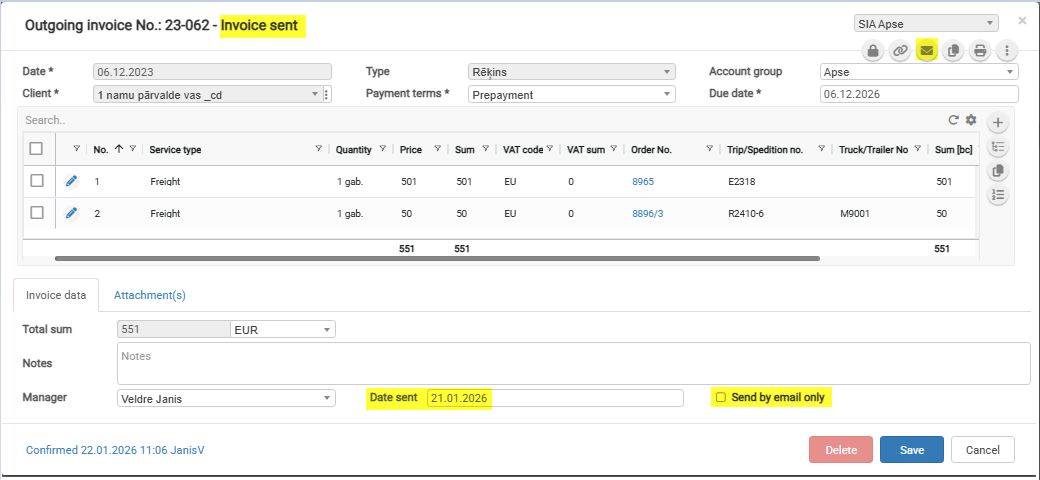
The “Send by email only” checkbox value is set automatically when generating an invoice from an order.
The checkbox value depends on the “Send invoices” field value.
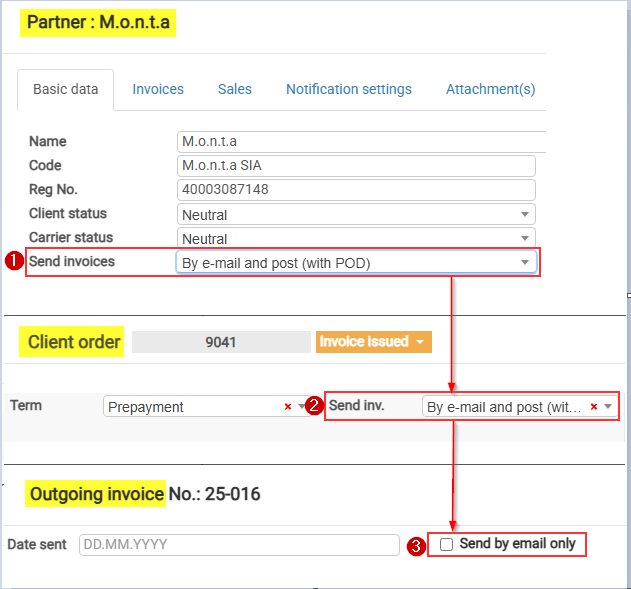
Send invoices values marked with “*” set the “Send by email only” checkbox value automatically:
-
By e-mail (with POD) *
-
By post (with POD)
-
By e-mail and post (with POD)
-
Don’t send (Self-billing) *
-
Download in client portal *
-
By e-mail (invoice upon delivery, second time with POD)
-
By e-mail (without POD) *
-
Upload to the customer portal together with POD